Talk to Andy
Andy detects screen/entity intent, returns focused How-To answers, searches records by name/SSID/URL, highlights requested JSON fields, queries live Calendar/Messaging/entity data and performs supported permission-checked actions.

Run a complete FM, CAFM, EAM and IWMS estate: asset health and predictive maintenance, IoT/BMS and condition monitoring, energy/carbon, compliance, permission-gated engineer operations, stores/procurement, space/property, projects/portfolios, helpdesk, PPMs, SLAs and reporting. AI Andy explains live operational data and proactively surfaces recommendations while Background Automation acts on operational risk in the background. Built-in WebRTC video calls and the persistent Translate control let distributed teams meet and work across languages without leaving Facilities Now.
| SSID | Name | Status |
|---|---|---|
| HD-2401 | Reception cooling fault | Open |
| HD-2398 | Door access issue | In Progress |
| HD-2387 | Lighting inspection | Active |
| SSID | Name | Status |
|---|---|---|
| AHU-01 | Air Handling Unit | Active |
| CH-02 | Chiller 02 | Open |
| LT-114 | Laptop 114 | Active |
Show the status of the reception cooling ticket.

HD-2401 is Open and linked to London HQ. The current SLA is still within target.
Ticket: HD-2401\nStatus: Open\nLocation: London HQ
Talk to Andy searches the built-in How-To, checks permitted live entity status by SSID or URL, shares conversations through Messaging and escalates referenced conversations to support. SSID-first multi-tenant records, email two-factor authentication, deny-by-default CRUD permissions with global role baselines and tenant overrides, a visual Background Automation-driven workflow engine, hierarchical JSON entity import/export and filterable audit evidence sit alongside maintenance, helpdesk, inventory, projects, documents, calendars and reports. The How-To is always first in the signed-in left menu, while AI Andy can search that guidance, resolve permitted entity SSIDs/URLs to live status, share conversations through Messages and escalate referenced conversations to support.
Andy detects screen/entity intent, returns focused How-To answers, searches records by name/SSID/URL, highlights requested JSON fields, queries live Calendar/Messaging/entity data and performs supported permission-checked actions.
128 adaptive logical crawlers discover FM/CAFM/EAM/IWMS and coding/SQL knowledge, feed quality-scored Stage-2 evidence into a 256-input / 512-hidden / 32-output neural model with 148,000 trainable parameters, then share that learned evidence with foreground Talk to Andy and Background Automation so chat explanations and proactive observations can improve over time.
Owner-only AI Update turns Stage-2 evidence and local code/schema analysis into a Database Performance Advisor, function-level Code Implementation Blueprints, Regression Test Generator Suggestions and an Evidence-driven Improvement Backlog. Every item carries confidence, evidence provenance, affected files and status for supervised review.
Each email address can create one company workspace and can still join additional companies by invitation. Company-creation help is available at admin@facilitiesnow.co.uk.
Free includes Standard Email support and AI Andy escalation with Instant application availability. Pay as you use, SMB and SMB Charity add Standard Email and Telephone Support from 8am–6pm Mon–Fri. Enterprise and Enterprise Charity provide 24-hour telephone/email support, one dedicated Customer Manager / Developer / Support staff member for each company, and availability within 48 hours of a new subscription or upgrade.
Every password login requires a time-limited six-digit email code before the user session opens.
Manager, Support, Engineer, Employee and Project Manager start with no List, Detail, Create, Update or Delete rights. Platform-global role defaults apply everywhere, tenant overrides can change them locally, explicit user overrides remain available, and Admin always has full access.
Export, import and generate templates as complete hierarchical JSON: real database fields plus nested relationships, with readable linked-record names wherever possible.
Connect Start, Trigger, Entity Update, Lookup, Action and End nodes by dragging node points. Background Automation workers re-check trigger conditions and follow multi-output lookup paths asynchronously.
Filter audits by user, entity, date and success/failure status, then export the filtered evidence to JSON.
Every entity keeps its normal authenticated detail. Turn on Allow public share for an individual record to publish a read-only detail URL and JSON output that can be opened without logging in.
Flag Locations or Location Zones as assets and manage them alongside equipment while keeping a clear Location / Location Zone identity.
Use the persistent Translate control on the landing page and throughout the signed-in workspace to translate visible interface/help content into major languages without changing the underlying operational records.
Share any record, detail or timeline item to one or more users through built-in Messaging, then move directly into Calendar or Video Calls when a live discussion is needed.
Every operational list can filter by connected entities, including direct relationships such as Location Zones by Location and generic linked records.
Left-click headings to sort. Right-click entity-list headings to remove columns or add fields from the current entity and its linked entities, with layouts remembered in the browser.
Lists and details open beneath the global menus as full content-area tabs. The tab strip stays pinned at the top while content scrolls; drag tabs to reorder them, close them with × or the screen Close action, and keep filters/forms mounted while switching work.
Use target minutes or target uptime percentage and review 12 months of uptime history wherever an SLA is attached.
Copy a record into an unsaved clone with linked entities staged for Save. Names remain unique per entity type and tenant.
Switch lists between table and thumbnail tiles, then choose the light desktop workspace or dark operations view from the persistent top bar.
| SSID | Name | Status |
|---|---|---|
| HQ-01 | London HQ | Active |
| WH-04 | North Warehouse | Open |
| SITE-12 | Service Centre | Active |
| SSID | Name | Status |
|---|---|---|
| PPM-302 | Quarterly AHU service | Due |
| PPM-298 | Fire door inspection | Active |
| PPM-287 | Water hygiene checks | Open |
| SSID | Name | Status |
|---|---|---|
| AHU-01 | Air Handling Unit | Active |
| CH-02 | Chiller 02 | Open |
| LT-114 | Laptop 114 | Active |
Every non-Admin role starts with no List, Detail, Create, Update or Delete rights. System administrators define a platform-global CRUD baseline for each role and entity; that baseline applies to every company and tenant unless a company administrator creates a tenant-specific role override. Explicit per-user overrides remain available for exceptions. The protected Admin role always has full access.
Define one CRUD permission set per role and entity as the cross-company baseline. New tenants inherit the same policy without having to recreate the matrix.
For tenant-scoped entities, company administrators can override a role’s global baseline only for the selected tenant, then reset it back to inheritance at any time.
Use explicit user-level CRUD overrides for exceptional access without changing the global role baseline or every user assigned to that role.
Admin is always full access. Its CRUD rights cannot be reduced by a global role edit, tenant override, copy operation or another account flag.
For non-Admins, effective access is resolved as user override → tenant role override → platform-global role default → deny, while company/tenant membership and assignment restrictions still apply.
Existing installations receive a one-time deny-by-default policy migration for non-Admin role defaults while preserving explicit user overrides.
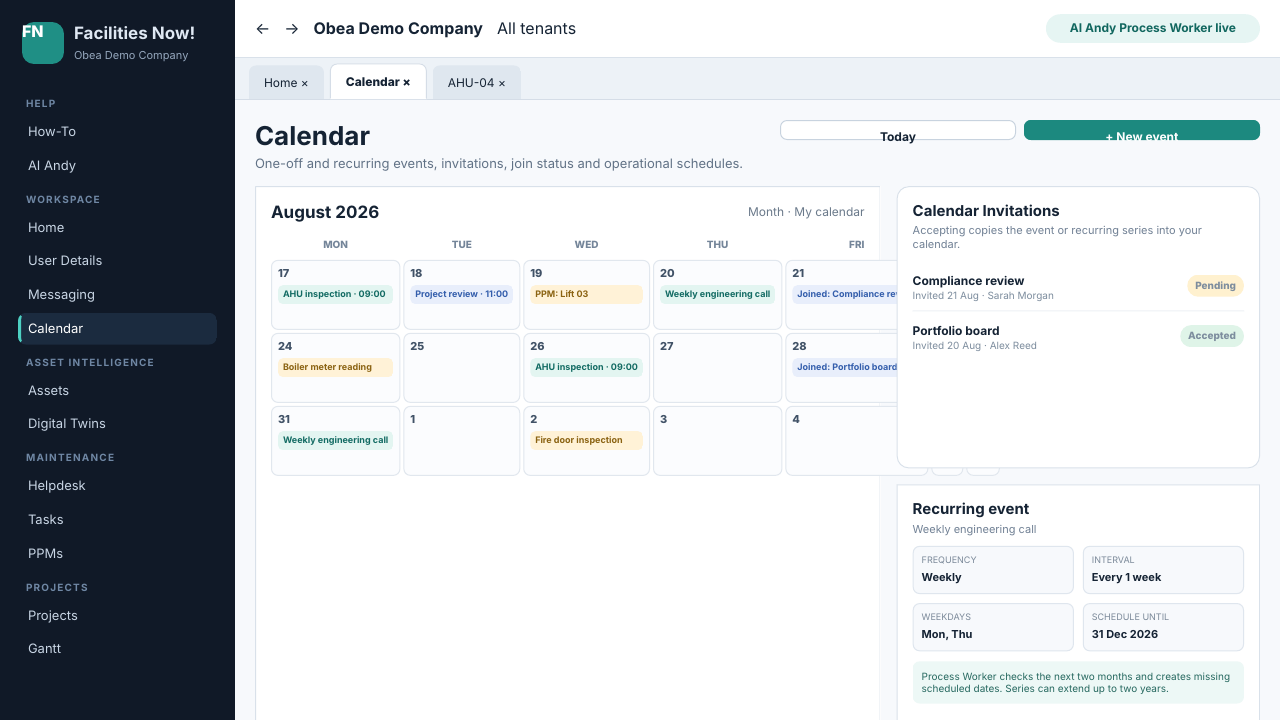
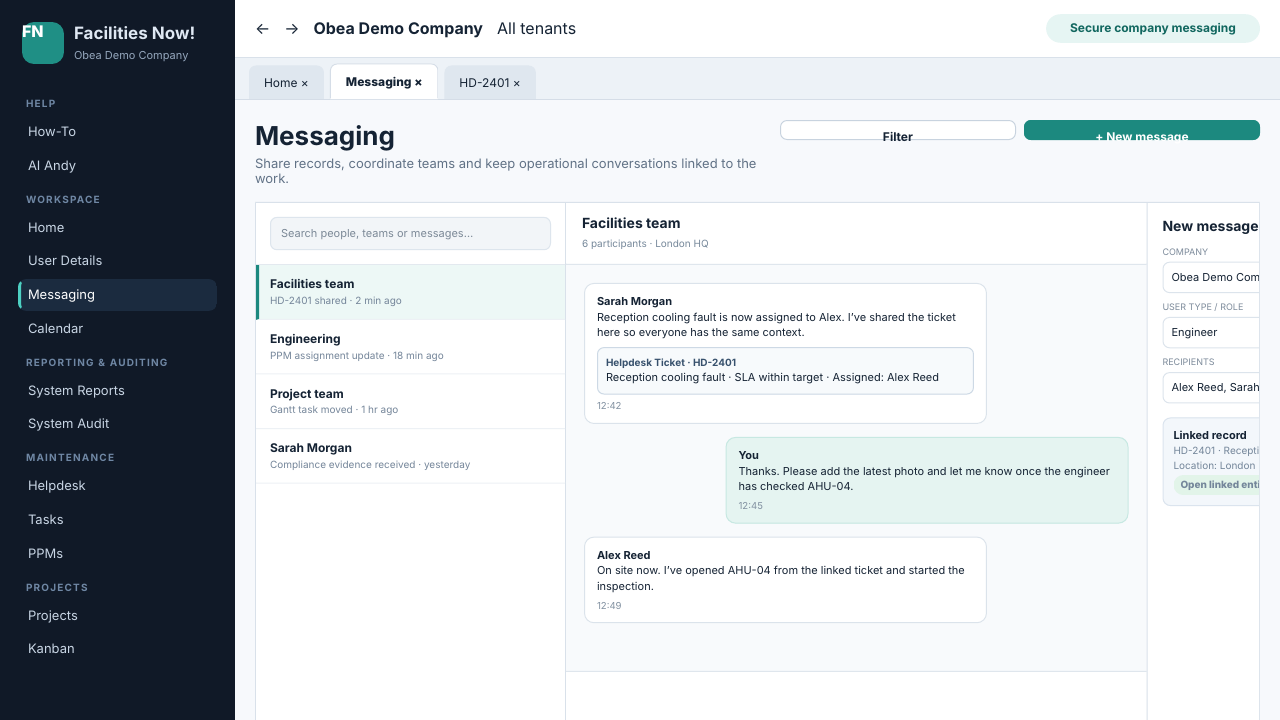
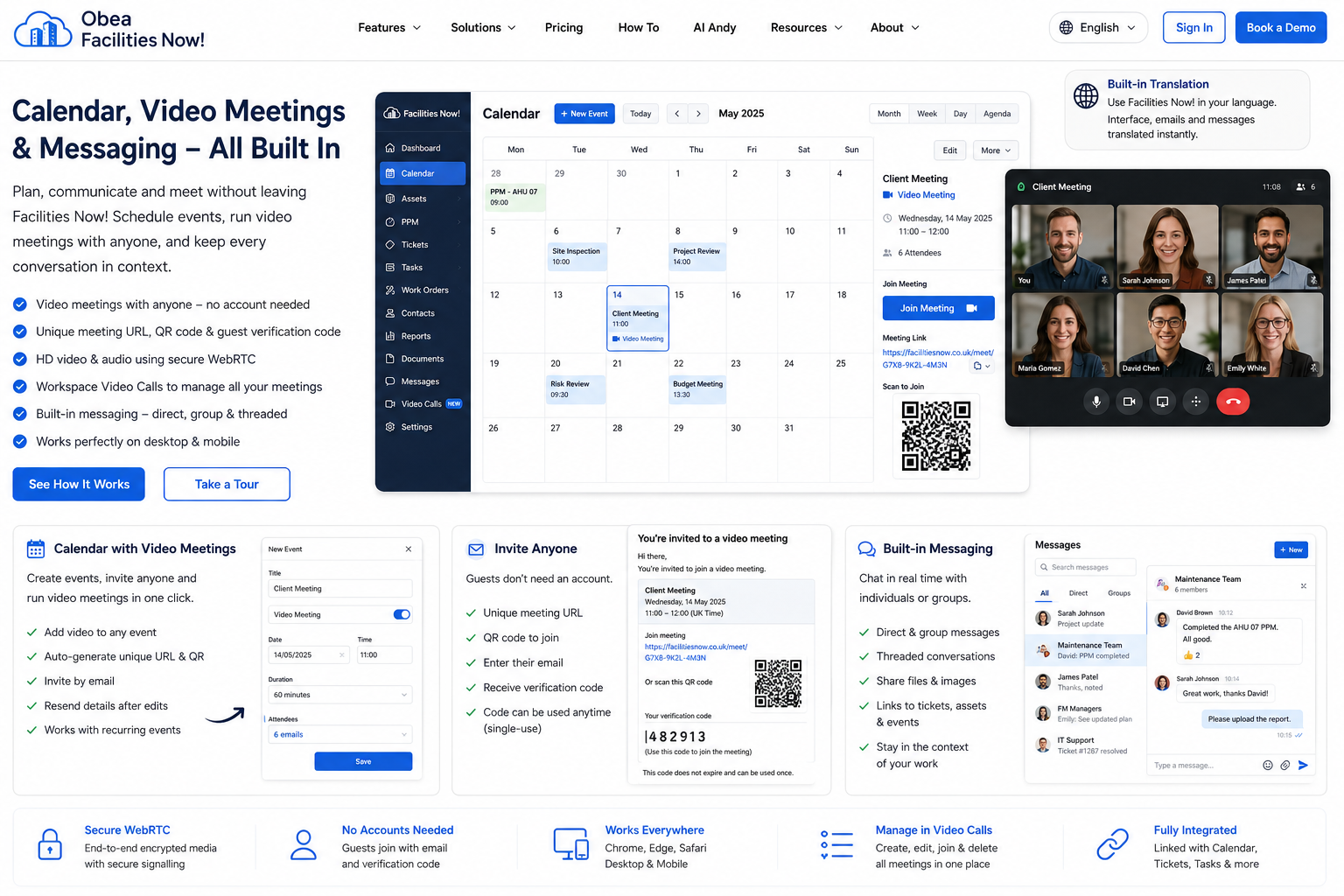
Calendar combines one-off and recurring events, multiple linked entities, conflict-checked Room / Desk booking, worker-maintained schedules, user invitations and secure browser video meetings. Every video meeting receives a unique URL and QR code. Organisers can select one or more existing system users and/or enter external attendee addresses, with duplicate emails merged automatically. Guests join without a Facilities Now account by entering only the one-time six-digit code already included in their invitation; the join screen does not ask for an email address. The code does not expire, remains single-use and is replaced when a newer invitation code is issued, while signed-in invited/company users can join automatically. Workspace → Video Calls lists meetings with Create, Edit, Delete and Join controls. Editing resends meeting details; deleting emails a cancellation. Messaging keeps conversations in the company workspace and lets users share permitted entity records and timeline context with the people who need them.
Facilities Now groups its active advanced-module catalogue into connected operational domains instead of one flat catalogue. Free, SMB and Pay as you use include every domain with finite advanced-record quotas; Enterprise removes advanced-module record limits. The same tenant permissions, assignments, audit, JSON portability, QR/unique URLs, linked entities, System Views/Reports, Background Automation and AI Andy controls apply throughout. Advanced records stay connected to core Assets, Locations, Helpdesk, Calendar, Projects and Documents rather than becoming isolated data silos.
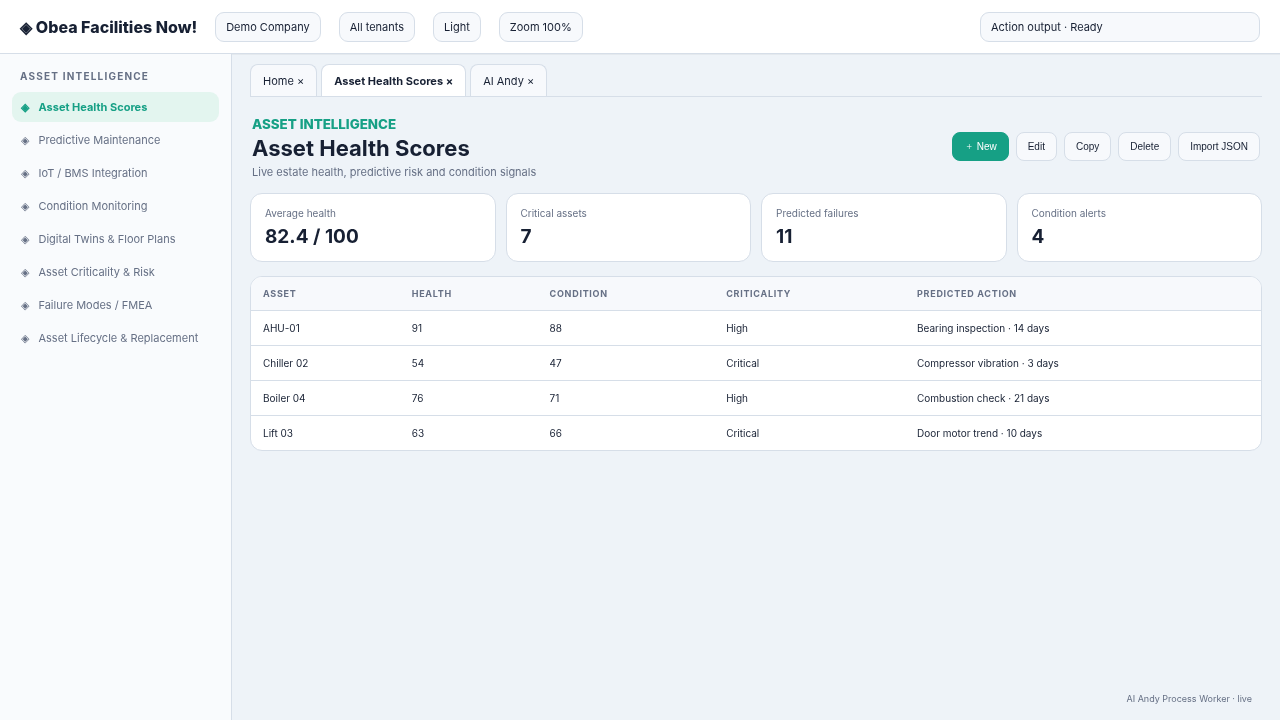
Understand condition, hierarchy, failure risk and whole-life cost through Health Scores, predictive maintenance, IoT/BMS, Condition Monitoring, FMEA, lifecycle, depreciation, warranties and TCO. Digital Twins and floor plans are managed with the locations and spaces they represent.
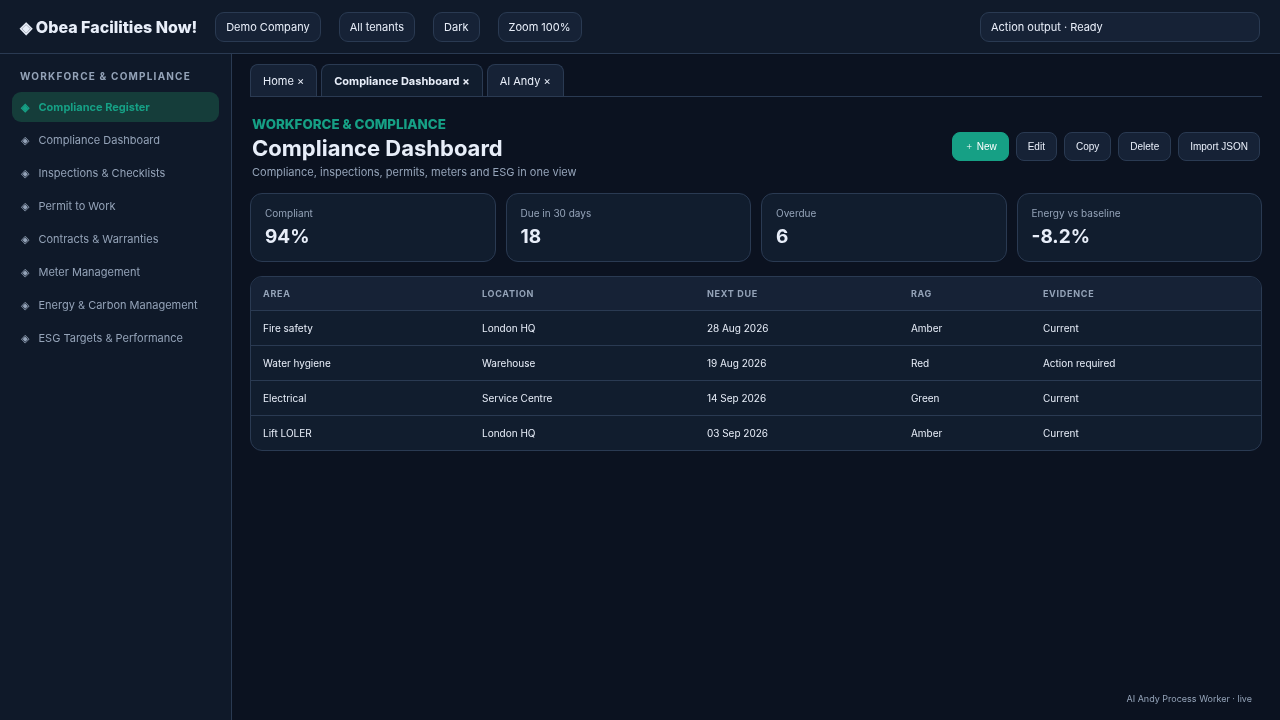
Control inspections, user Work Permits, compliance registers, dashboards, evidence packs and reusable work templates while connecting work to SLA performance, Assets and responsible users.
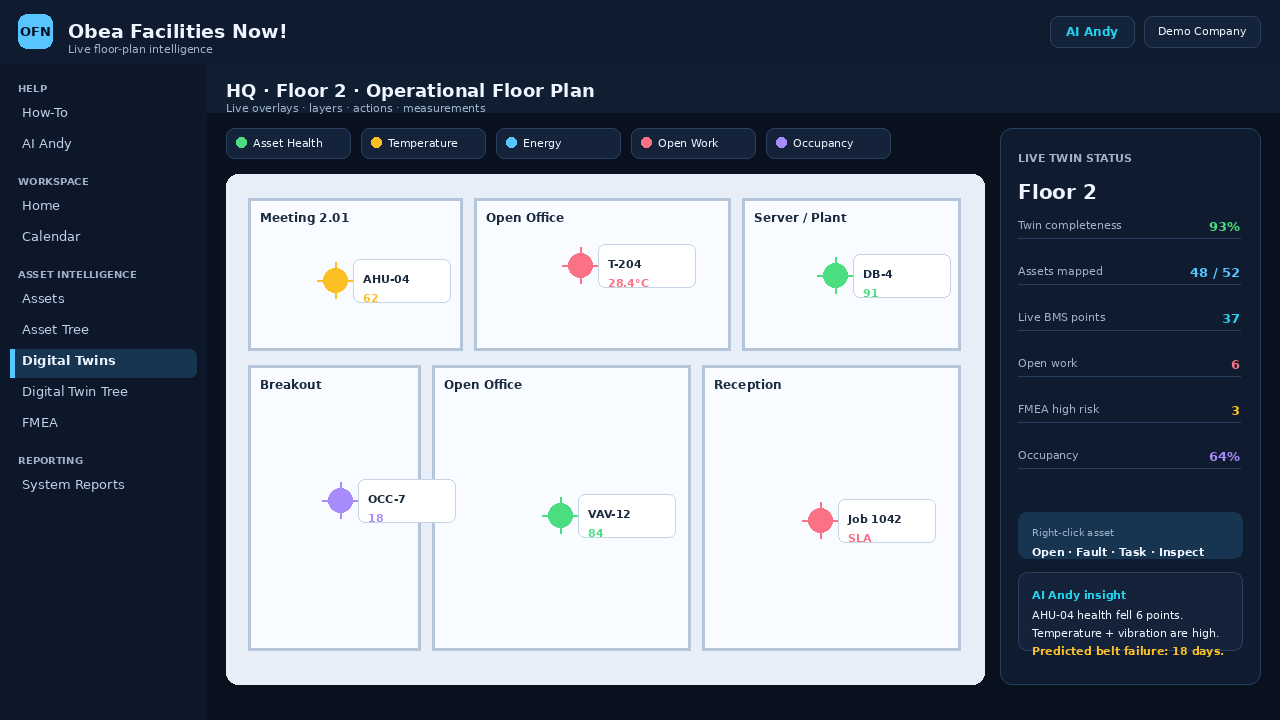
Retain meter-reading history, analyse consumption and carbon, manage ESG targets and connect energy performance to assets, spaces and live Digital Twin overlays.
Manage location-aware inventory, supplier product and ordering details, outstanding purchase orders, tracking and goods receipt around the work and assets they support.
Coordinate engineers through the permission-gated Engineer Portal, integrated Skills & Qualifications and Work Permits, QR/NFC actions and merged Time-Sheets/Labour. Users record their own From/To time from Workspace against free text, Tasks, PPMs or service attendance; Admins and Managers edit workforce entries from Users & Access. Provided Services can award verified Skills/Qualifications on completion, and capability-aware Task/PPM assignment uses the same workforce record.
Manage Locations, Location Zones / Spaces and Desks as one operational place model. Location and Zone / Space details include Digital Twin Documents and Available Services with a 12-month availability calendar; Locations also carry Lease & Property Management, while Zones / Spaces include Space & Occupancy and their Desks. Room / Desk Booking reserves either a Location Zone / Space or a Desk assigned to it. Add Visitor creates badge-ready QR/URL records and Current Visitors manages on-site departures.
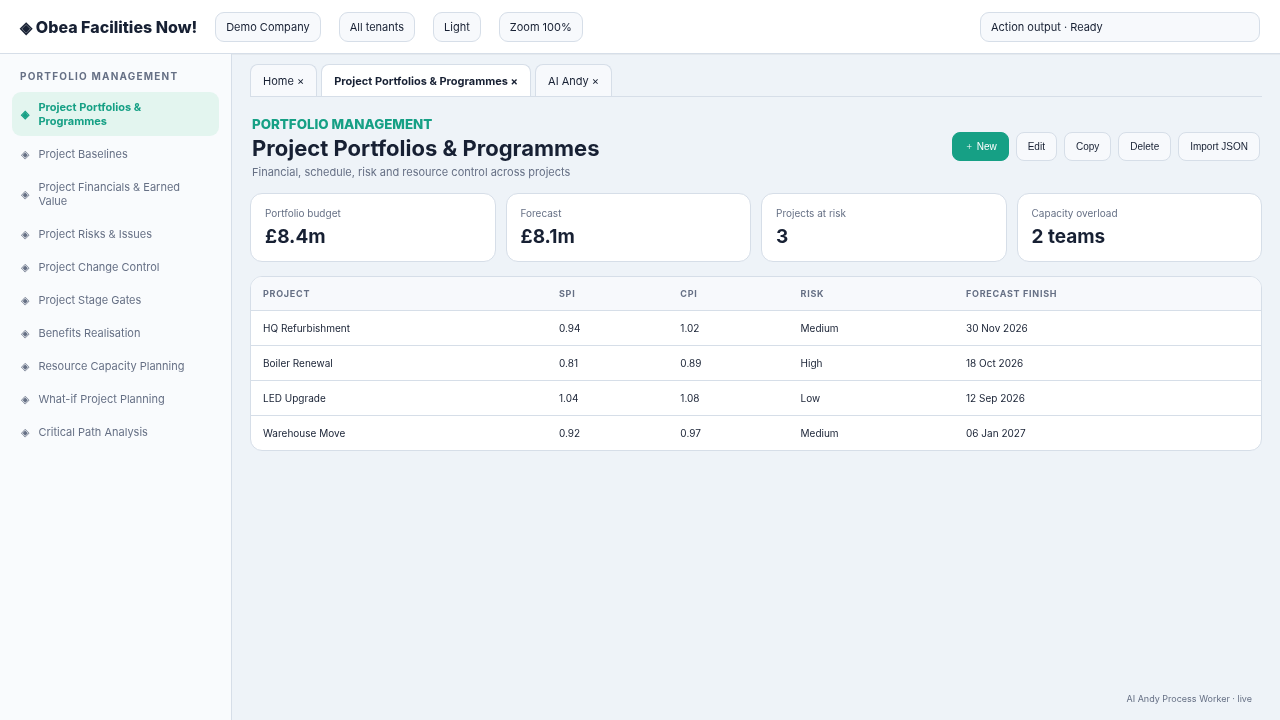
Extend Projects, Kanban and Gantt with baselines, earned value, risks, changes, stage gates, benefits, capacity, scenarios, critical path and AI project-risk prediction.
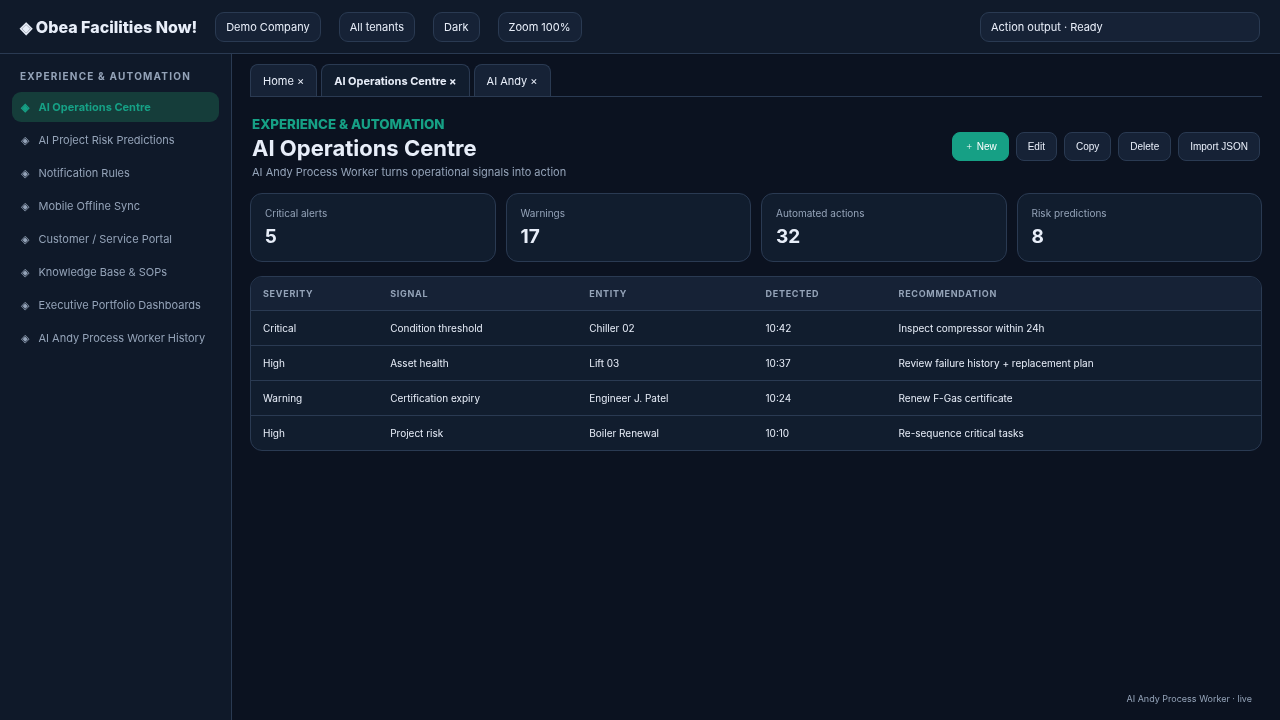
Prepare for incidents and continuity events, model dependencies and service impacts, retain knowledge, capture customer requests and let AI Operations surface cross-domain risk.
Free, SMB and Pay as you use use an exact per-module quota map rather than one generic cap. The active advanced-module table in Pricing is the source-of-truth presentation of every current advanced-module limit. Pay as you use inherits the SMB advanced-module map while Assets remain unlimited at £5 per billable Asset/month (monthly only). Enterprise and Charity Enterprise advanced-module records are unlimited.
Limits apply consistently to UI/API creates, JSON imports, AI Andy actions, worker-created records and Calendar-generated room/desk bookings. Billing shows Used, Limit and Remaining per module.
AI Andy is built as a hybrid operational intelligence layer rather than a single black-box chatbot. Deterministic Facilities Now workers and entity resolvers establish current evidence and remain authoritative for live facts, permissions and executed actions. Background Automation supplies proactive signals from Helpdesk, Assets, FMEA/RPN, condition readings, PPM, SLA, stock, compliance, projects and worker health. Tenant-local adaptive memory remembers relevant corrections and preferences. A first-party site-wide neural model then learns how facilities requirements are phrased and which abstract actions tend to succeed, without exposing one tenant’s raw data to another.
A stock warning naming Network Equipment and Power Equipment is not answered from memory. Andy first resolves those Inventory records and checks live Quantity/Reorder Level/SKU/Unit. The neural model can help understand that “qty”, “stock”, “replenishment” and “shortage” are related requirements and can rank useful next steps, but the current database values remain the evidence.
AI AndyEvidence first · adaptive interpretation · permission boundedShow the status of the reception cooling ticket.
HD-2401 is Open and linked to London HQ. The current SLA is still within target.
Ticket: HD-2401\nStatus: Open\nLocation: London HQ
| Layer | Principle | Purpose |
|---|---|---|
| Language input | Signed hashed tokens + n-grams | Interpret wording |
| Hidden | 512 trainable tanh neurons | Learn nonlinear patterns |
| Output | 32 multi-label scores | Domain + action + requirement + product proposals |
| Training | Online SGD + decaying rate | Continuous improvement |
| Stage | Purpose | Safety |
|---|---|---|
| 1 · Domain discovery | Generate candidate domains from current landing/How-To terms and scan untried addresses | Public-host validation + scan history |
| 2 · Knowledge crawl | Scrape every accepted source | RFC 9309 + rate limits |
| Engineering discovery | Content-derived crawler + JS/React/PHP/MySQL coding domains | Evidence only |
| Learning stability | Monitor loss + clip gradients when sustained | Bounded updates |
Show the status of the reception cooling ticket.
HD-2401 is Open and linked to London HQ. The current SLA is still within target.
Ticket: HD-2401\nStatus: Open\nLocation: London HQ
| Event | Automation | Status |
|---|---|---|
| PW-24 | PPM Task create + assign | Success |
| PW-23 | Kanban due-soon alert | Warning |
| PW-22 | Gantt overdue alert | Critical |
| PW-21 | SLA early warning | Success |
The Knowledge Gathering Layer combines 128 adaptive crawlers, shared Stage-2 evidence, memory, privacy-safe abstract learning and a 256-input / 512-hidden / 32-output neural model with 148,000 trainable parameters. That separation is what allows a site-wide model to improve from many companies while each operational answer still returns through the same tenant-aware database and permission layer.
ai-update.php owner control plane—outside the SPA and deliberately not linked from the application—shows model/weight state, 128-crawler strategy/TLD/language yields, matches-per-100 KPIs, scan history, learned vocabulary, negative memory, domain graph/frontier, Stage-2 host quality/freshness, RFC 9309/backoff/timeout telemetry, code candidates and full apply/rollback chronology./ai-update.php reveals only a secret prompt until the dedicated server-side AI update secret is accepted; controls lock again automatically.| Layer | Principle | Purpose |
|---|---|---|
| Language input | Signed hashed tokens + n-grams | Interpret wording |
| Hidden | 512 trainable tanh neurons | Learn nonlinear patterns |
| Output | 32 multi-label scores | Domain + action + requirement + product proposals |
| Training | Online SGD + decaying rate | Continuous improvement |
| Stage | Purpose | Safety |
|---|---|---|
| 1 · Domain discovery | Generate candidate domains from current landing/How-To terms and scan untried addresses | Public-host validation + scan history |
| 2 · Knowledge crawl | Scrape every accepted source | RFC 9309 + rate limits |
| Engineering discovery | Content-derived crawler + JS/React/PHP/MySQL coding domains | Evidence only |
| Learning stability | Monitor loss + clip gradients when sustained | Bounded updates |
| Event | Automation | Status |
|---|---|---|
| PW-24 | PPM Task create + assign | Success |
| PW-23 | Kanban due-soon alert | Warning |
| PW-22 | Gantt overdue alert | Critical |
| PW-21 | SLA early warning | Success |
Show the status of the reception cooling ticket.
HD-2401 is Open and linked to London HQ. The current SLA is still within target.
Ticket: HD-2401\nStatus: Open\nLocation: London HQ
Background Automation runs continuously according to subscription scope. Alongside workflow reconciliation, Calendar housekeeping, PPM scheduling, SLA monitoring, compliance checks, stock forecasting and worker-health supervision, the AI Andy recommendation worker correlates cross-domain evidence into Talk to Andy (n). Twenty dedicated intelligence workers refresh the tenant knowledge graph, supervise specialist-agent plans, learn rewards/contextual bandits, replay experience, run benchmarks and champion/challenger evaluation, monitor confidence/drift, forecast failure/RUL/SLA/stock/energy/project/supplier risk, generate causal/counterfactual Digital Twin simulations, consolidate memory, enforce privacy/safety, red-team the model, optimise work and react to high-signal events. The separate 512-Neuron Learning + Spider Worker trains language/requirements interpretation from bounded privacy-safe outcomes and derived public knowledge vectors. An hourly Spider Code Research Worker uses the adaptive 128-crawler technical families plus direct PHP.net, GitHub, W3Schools and Stack Exchange evidence, then studies accepted public sources and evaluates local core-file/database techniques, and a protected two-hour Learning Code Upgrade Worker can automatically apply only pre-approved, neurally beneficial, linted and rollback-safe improvements to whitelisted Andy PHP files. The separate secret-protected ai-update.php control centre is not linked from the tenant SPA; the owner opens it directly as its own desktop-style SPA with a left menu, persistent open tabs and tab strip. Its live crawler workspace auto-refreshes tested webpages, supports text/status/control filters, owner Whitelist/Blacklist/Rescan actions and a manual Scan URL control, while the product-proposal workspace lets the owner Implement, mark Completed or Ignore suggestions so handled items leave the active list. The same control centre also exposes shared model/network state, adaptive crawler yield, learned/negative memory, domain graph/frontier, Stage-2 quality/freshness, RFC 9309/backoff/timeout/gradient telemetry, code-research coverage, exact From → To excerpts, applied/blocked/rollback history and manual apply/rollback controls without exposing another tenant’s operational data.
| Event | Automation | Status |
|---|---|---|
| PW-24 | PPM Task create + assign | Success |
| PW-23 | Kanban due-soon alert | Warning |
| PW-22 | Gantt overdue alert | Critical |
| PW-21 | SLA early warning | Success |
| Event | Automation | Status |
|---|---|---|
| PW-24 | PPM Task create + assign | Success |
| PW-23 | Kanban due-soon alert | Warning |
| PW-22 | Gantt overdue alert | Critical |
| PW-21 | SLA early warning | Success |
Show the status of the reception cooling ticket.
HD-2401 is Open and linked to London HQ. The current SLA is still within target.
Ticket: HD-2401\nStatus: Open\nLocation: London HQ
Projects open in full-size reorderable workspace tabs. Every new Board starts with Notes, Requested, In Progress, On Hold and Complete lanes; lanes and Cards can be colour-coded. Gantt Charts use the linked Project dates, support hierarchical Tasks with prerequisites, and let users draw work directly across the timeline.
| SSID | Name | Status |
|---|---|---|
| PRJ-14 | Office refurbishment | Active |
| PRJ-11 | HVAC controls upgrade | Open |
| PRJ-09 | LED replacement | Active |
| SSID | Name | Status |
|---|---|---|
| PRJ-14 | Office refurbishment | Active |
| PRJ-11 | HVAC controls upgrade | Open |
| PRJ-09 | LED replacement | Active |
| SSID | Name | Status |
|---|---|---|
| PRJ-14 | Office refurbishment | Active |
| PRJ-11 | HVAC controls upgrade | Open |
| PRJ-09 | LED replacement | Active |
| Event | Automation | Status |
|---|---|---|
| PW-24 | PPM Task create + assign | Success |
| PW-23 | Kanban due-soon alert | Warning |
| PW-22 | Gantt overdue alert | Critical |
| PW-21 | SLA early warning | Success |
Helpdesk Tickets can turn reusable Maintenance Steps into assigned Tasks, shared Calendar bookings and user Messages. PPMs use the same procedures, show two years of due dates and can be scheduled manually or by Background Automation workers.
Create a Ticket with or without an Asset. Asset-linked Tickets inherit read-only Location/Location Zone and an overridable SLA. Selected Maintenance Steps resolve all configured users, roles or user groups, create linked Tasks, find the earliest shared available slot for the procedure duration, create Calendar entries and send Messages.
| SSID | Name | Status |
|---|---|---|
| HD-2401 | Reception cooling fault | Open |
| HD-2398 | Door access issue | In Progress |
| HD-2387 | Lighting inspection | Active |
PPMs link reusable Maintenance Steps with recurrence. The PPM detail calendar shows calculated due dates for the next two years. Right-click a due event and choose Schedule, or let Background Automation workers create and assign unscheduled due occurrences once they enter the next two months, book shared Calendar time and message the assignees.
| SSID | Name | Status |
|---|---|---|
| PPM-302 | Quarterly AHU service | Due |
| PPM-298 | Fire door inspection | Active |
| PPM-287 | Water hygiene checks | Open |
| SSID | Name | Status |
|---|---|---|
| PPM-302 | Quarterly AHU service | Due |
| PPM-298 | Fire door inspection | Active |
| PPM-287 | Water hygiene checks | Open |
| Event | Automation | Status |
|---|---|---|
| PW-24 | PPM Task create + assign | Success |
| PW-23 | Kanban due-soon alert | Warning |
| PW-22 | Gantt overdue alert | Critical |
| PW-21 | SLA early warning | Success |
| SSID | Name | Status |
|---|---|---|
| TSK-81 | Check filters | Open |
| TSK-79 | Inspect plant room | Active |
| TSK-74 | Review SLA breach | Open |
Workspace → Engineer Portal is generated for Engineer-role and Is Contractor users only. It shows assigned entities and Tasks plus eligible unassigned Tasks that match every required Skill or Qualification. Engineers can Assign to me, which assigns the Task and adds it to their Calendar. Users & Access carries Skills & Qualifications and Work Permits, while System Setup provides auto-populated type catalogues.
No New, Edit or Delete controls: the portal is a live operational view of the current engineer’s assignments.
Tasks and PPMs can require multiple Skills or Qualifications. Manual assignment, self-assignment and generated PPM work reject users who do not meet every requirement.
Manage permits directly on Users & Access using tenant Work Permit types from System Setup.
Help → Contact Obea Support emails Bug and Enhancement requests directly to admin@facilitiesnow.co.uk.
Locations and Location Zones / Spaces can be flagged as assets, carry SLAs, QR links and relationships, and filter every dependent selector to the correct place. Locations include Digital Twin Documents, Available Services with a next-12-month availability calendar and Lease & Property Management. Zones / Spaces add their own Twin Documents, Available Services, Desks and Space & Occupancy. The Desks list filters by Location and Zone / Space; Room / Desk Booking reserves either the Zone / Space itself or one of its Desks. Add Visitor creates badge-ready visitor records with QR and unique URL, while Current Visitors shows who is on site and provides Visitor Left Site.
| SSID | Name | Status |
|---|---|---|
| HQ-01 | London HQ | Active |
| WH-04 | North Warehouse | Open |
| SITE-12 | Service Centre | Active |
| SSID | Name | Status |
|---|---|---|
| HD-2401 | Reception cooling fault | Open |
| HD-2398 | Door access issue | In Progress |
| HD-2387 | Lighting inspection | Active |
| SSID | Name | Status |
|---|---|---|
| AHU-01 | Air Handling Unit | Active |
| CH-02 | Chiller 02 | Open |
| LT-114 | Laptop 114 | Active |
Show the status of the reception cooling ticket.
HD-2401 is Open and linked to London HQ. The current SLA is still within target.
Ticket: HD-2401\nStatus: Open\nLocation: London HQ
Create user-defined table data with primary and foreign keys, manage rows with full CRUD, combine custom data with Facilities Now entities through LEFT, RIGHT, FULL OUTER or INNER joins, then lay out reusable reports on a drag-and-drop blank page.
Create custom tables and fields, mark a primary key, link foreign keys and create, view, edit, copy or delete row data without exposing unrestricted SQL or database DDL.
Build read-only executable views from custom data and standard Facilities Now entities, with selected outputs, filters and governed joins.
Drag single-line or multi-line text, images, tables and lists onto a blank report page. Mix free text with dragged live entity fields and saved joined data.
Save and reload reports and views, then grant named users or roles independent View, Edit and Execute rights.
● Contract ID · Primary key
Supplier · Foreign key
Renewal Date · Date
Annual Cost · Number
● Supplier ID · Primary key
Name · Text
Account Manager · Text
Risk Rating · Text
| Contract | Supplier | Renewal | Cost |
|---|---|---|---|
| CTR-104 | Northstar FM | 30 Sep | £42,000 |
| CTR-105 | City Engineering | 18 Oct | £18,500 |
| CTR-106 | LiftSafe UK | 07 Nov | £29,800 |
| Contract | Supplier | Location | Renewal |
|---|---|---|---|
| CTR-104 | Northstar FM | London HQ | 30 Sep |
| CTR-105 | City Engineering | North Warehouse | 18 Oct |
| CTR-106 | LiftSafe UK | London HQ | 07 Nov |
| Contract | Supplier | Renewal |
|---|---|---|
| CTR-104 | Northstar FM | 30 Sep 2026 |
| CTR-105 | City Engineering | 18 Oct 2026 |
System Views live under Reporting and Auditing. The built-in catalogue covers core operations, Failure Codes and advanced FM / CAFM / EAM / IWMS areas, but each signed-in user sees only views whose underlying entity they have Read access to; permissions are rechecked when a view runs.
Operational, exception, priority, governance, threshold, portfolio, compliance, automation, service and summary views are available when their source entity is readable.
CRUD Permissions controls System View List and Detail access. Create, Update and Delete stay disabled because the built-in definitions are read-only.
Opening a System View also requires Read access to its underlying Facilities Now entity for the selected tenant.
Use System Views as Report data sources and assign individual System Views to users through Admin → Entity Assignment.
| System View | Type | Entity area |
|---|---|---|
| Overdue Helpdesk Tickets | Exception | Helpdesk |
| Assets Without an SLA | Governance gap | Assets |
| Projects Ending in 30 Days | Forward look | Projects |
| Active Assignments by User | Summary | Assignments |
| SSID | Name | Status |
|---|---|---|
| AHU-01 | Air Handling Unit | Active |
| CH-02 | Chiller 02 | Open |
| LT-114 | Laptop 114 | Active |
| System View | Type | Entity area |
|---|---|---|
| Overdue Helpdesk Tickets | Exception | Helpdesk |
| Assets Without an SLA | Governance gap | Assets |
| Projects Ending in 30 Days | Forward look | Projects |
| Active Assignments by User | Summary | Assignments |
System Reports cover the facilities estate, maintenance, projects, automation, people and audit activity. Reports are omitted from the catalogue when the signed-in user cannot Read their required source entities, and permission is rechecked at execution. Outputs can include the company name, charts, tables, Print, a stable unique URL and QR code.
Core operational, reliability and advanced FM / CAFM / EAM / IWMS reports are filtered to the source entities the current user can Read. The Unassigned Tasks report highlights open Tasks with no assignee, while Time-Sheets by User & Period provides multi-user workforce time, labour category/cost and work-reference reporting.
Company-branded report pages with print-friendly chart and table layouts.
Runs use the signed-in user, current company and selected tenant read permissions.
Every System Report has a unique application URL and QR code for fast reopening.
| Asset | Location | Status |
|---|---|---|
| AHU-01 | Head Office | Open |
| Boiler 02 | North Warehouse | Attention |
| Asset | Location | Status |
|---|---|---|
| AHU-01 | Head Office | Open |
| Boiler 02 | North Warehouse | Attention |
Live application screen previews replace recreated mock imagery and mix light and dark workspace presentations.
| SSID | Name | Status |
|---|---|---|
| AHU-01 | Air Handling Unit | Active |
| CH-02 | Chiller 02 | Open |
| LT-114 | Laptop 114 | Active |
| SSID | Name | Status |
|---|---|---|
| HD-2401 | Reception cooling fault | Open |
| HD-2398 | Door access issue | In Progress |
| HD-2387 | Lighting inspection | Active |
Show the status of the reception cooling ticket.
HD-2401 is Open and linked to London HQ. The current SLA is still within target.
Ticket: HD-2401\nStatus: Open\nLocation: London HQ
The same global controls are available on the landing page and throughout the signed-in app. Choose a named colour-blind palette, change font and text size, zoom the whole page, set an optional text colour, and switch operational lists between table and visual tile/icon views.
| SSID | Name | Status |
|---|---|---|
| HQ-01 | London HQ | Active |
| WH-04 | North Warehouse | Open |
| SITE-12 | Service Centre | Active |
| SSID | Name | Status |
|---|---|---|
| AHU-01 | Air Handling Unit | Active |
| CH-02 | Chiller 02 | Open |
| LT-114 | Laptop 114 | Active |
| SSID | Name | Status |
|---|---|---|
| AHU-01 | Air Handling Unit | Active |
| CH-02 | Chiller 02 | Open |
| LT-114 | Laptop 114 | Active |
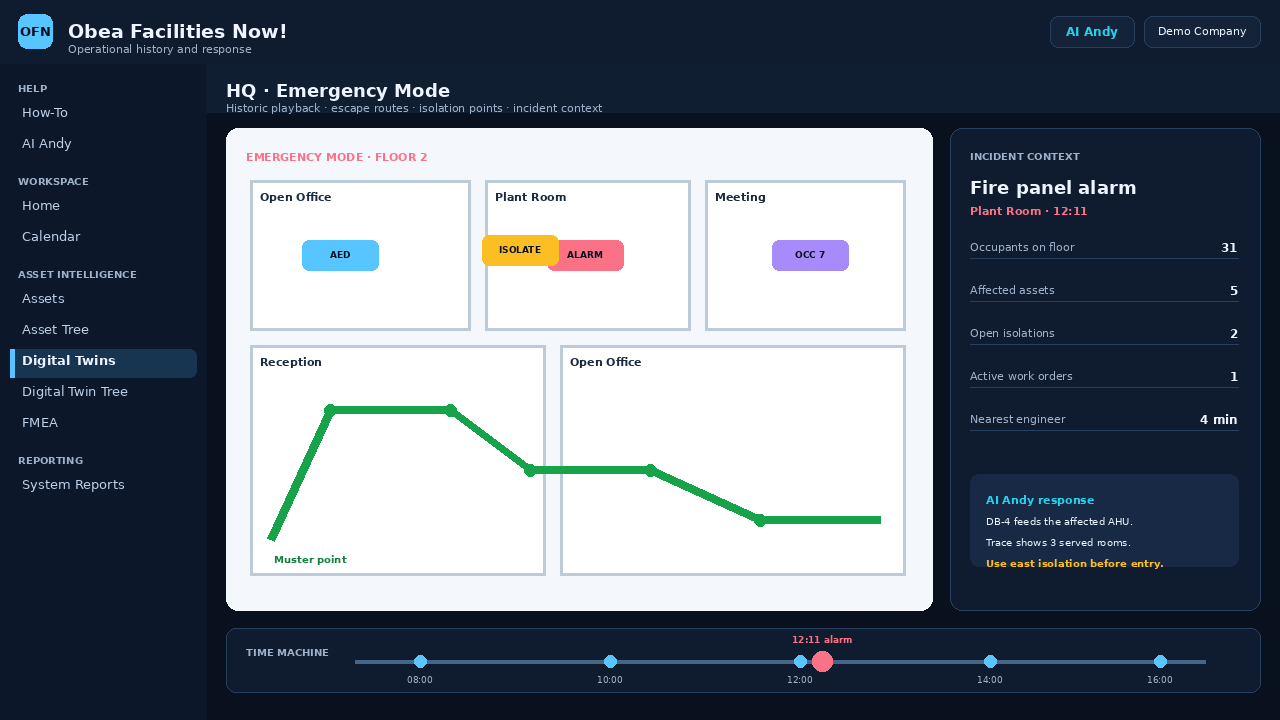
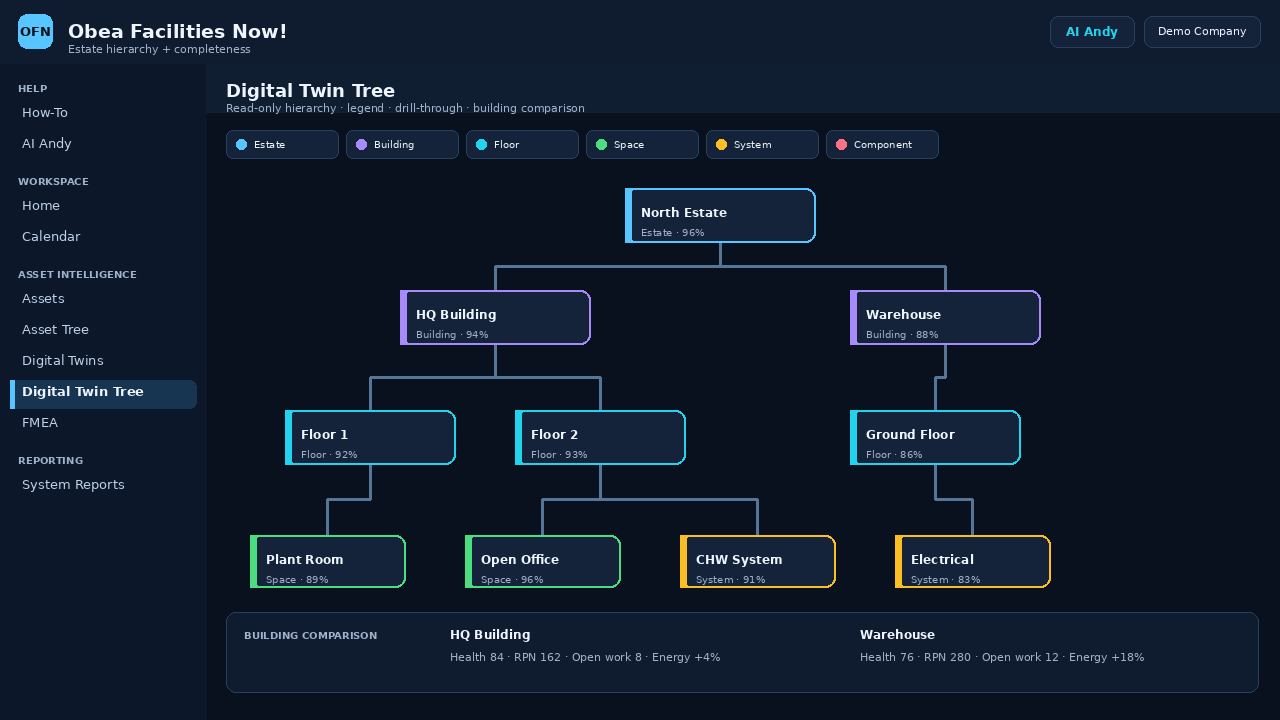
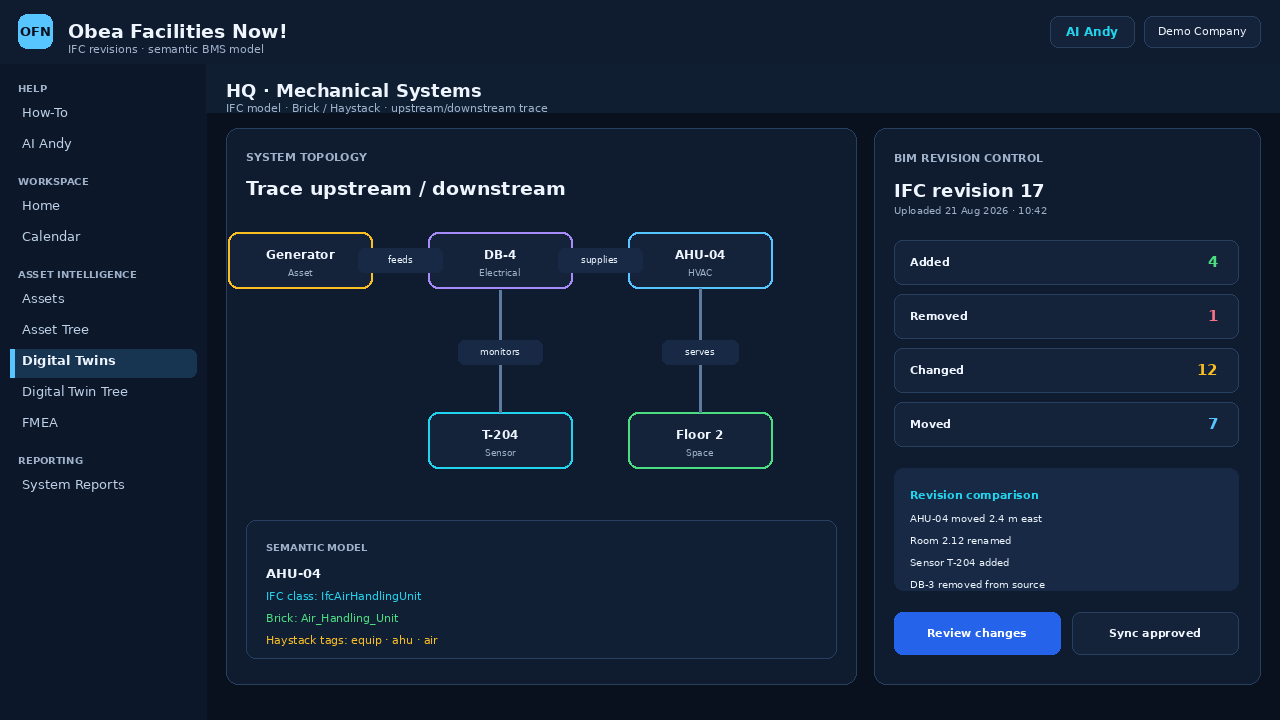
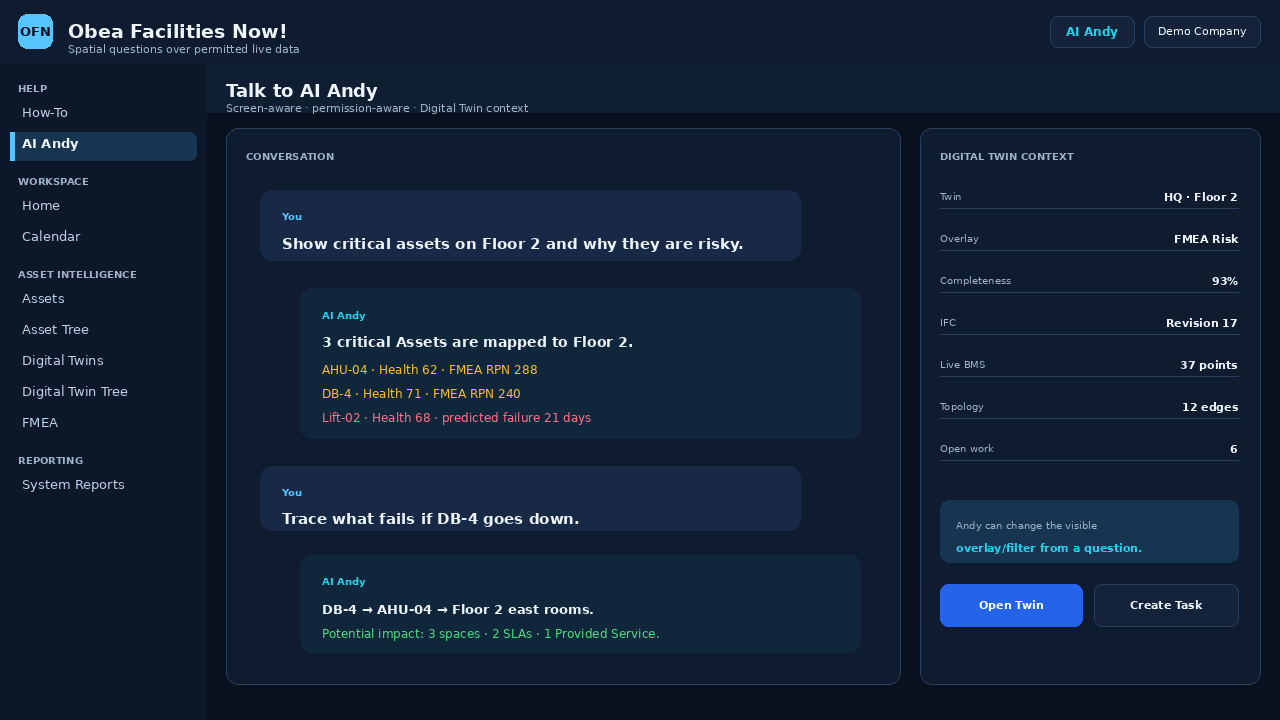
Digital Twins & Floor Plans and Digital Twin Tree now live under Location Management. Use interactive floor-plan placements, Location/Zone/Asset context, live Asset Health/IoT/energy/occupancy/work/compliance/FMEA overlays, IFC/BIM revision comparison, Brick/Haystack semantics, system topology, indoor routes, time-machine playback, emergency mode, Twin permissions, optional 3D and AI Andy spatial questions.
Facilities Now extends FM helpdesk into a full operational service desk with Requester Portal, Customer / Service Portal, Guided Request Forms and service-catalogue self-service. Every active company user can use Calendar, Messaging, Book a Service and Room / Desk Booking without needing a CRUD role grant. Intake requests from the portals, email/API adapters, QR/unique URLs, Calendar, AI Andy, Engineer Portal users, IoT/BMS alarms, PPMs, Inspections and Workflows. Automatic triage calculates P1–P5 priority from Impact × Urgency, detects likely duplicates and parent/child relationships, groups clusters into Major Incidents, identifies recurring Problems, governs Changes, recommends engineers from Skills & Qualifications without automatic assignment, suggests Knowledge/SOP content, tracks requester confirmation and CSAT, and lets AI Andy surface unprompted evidence-backed Problem recommendations from recurring demand.
| SSID | Name | Status |
|---|---|---|
| HD-2401 | Reception cooling fault | Open |
| HD-2398 | Door access issue | In Progress |
| HD-2387 | Lighting inspection | Active |
| Event | Automation | Status |
|---|---|---|
| PW-24 | PPM Task create + assign | Success |
| PW-23 | Kanban due-soon alert | Warning |
| PW-22 | Gantt overdue alert | Critical |
| PW-21 | SLA early warning | Success |
Show the status of the reception cooling ticket.
HD-2401 is Open and linked to London HQ. The current SLA is still within target.
Ticket: HD-2401\nStatus: Open\nLocation: London HQ
| SSID | Name | Status |
|---|---|---|
| AHU-01 | Air Handling Unit | Active |
| CH-02 | Chiller 02 | Open |
| LT-114 | Laptop 114 | Active |
Pay as you use is monthly only at £5 per Asset per month. SMB, SMB Charity, Enterprise Charity and Enterprise can be purchased monthly or yearly, with lower yearly pricing than 12 monthly payments. Free includes Standard Email support and AI Andy escalation with Instant application availability. Pay as you use, SMB and SMB Charity include Standard Email and Telephone Support 8am–6pm Mon–Fri with Instant availability. Enterprise and Enterprise Charity include 24-hour telephone and email support, one dedicated Customer Manager / Developer / Support staff member per company, and application availability within 48 hours of a new subscription or upgrade.
Save money by paying yearly. SMB Tier saves £24,992/year, SMB Charity Tier saves £25,000/year, Enterprise Charity Tier saves £99,996/year and Enterprise Tier saves £100,000/year compared with 12 monthly payments.
These are the same core limits and feature gates enforced by Facilities Now. Unlimited means the subscription does not impose a plan cap on that item; core entities without a dedicated cap (for example Tasks, Tickets, Customers, Suppliers, Inventory, Documents and Services) remain unlimited. Pay as you use keeps the SMB non-Asset limits while Assets are unlimited and billed monthly.
| Limit / feature | Free | Pay as you use | SMB Tier | SMB Charity Tier | Enterprise Charity Tier | Enterprise Tier |
|---|---|---|---|---|---|---|
| Tenants | 1 | 3 | 3 | 3 | Unlimited | Unlimited |
| Assigned users | 5 | 10 | 10 | 10 | Unlimited | Unlimited |
| Assets | 20 | Unlimited · £5/Asset/month | 1,000 | 1,000 | Unlimited | Unlimited |
| Locations + Location Zones / Spaces | 10 | 50 | 50 | 50 | Unlimited | Unlimited |
| PPM schedules | 10 | 50 | 50 | 50 | Unlimited | Unlimited |
| SLA types | 3 | 10 | 10 | 10 | Unlimited | Unlimited |
| Workflows | 5 | 50 | 50 | 50 | Unlimited | Unlimited |
| Projects | 1 | 5 | 5 | 5 | Unlimited | Unlimited |
| Kanban boards | 1 | 5 | 5 | 5 | Unlimited | Unlimited |
| Daily requests | 10,000 / day | Unlimited | Unlimited | Unlimited | Unlimited | Unlimited |
| Helpdesk tickets | Unlimited | Unlimited | Unlimited | Unlimited | Unlimited | Unlimited |
| Other core entity records | Unlimited | Unlimited | Unlimited | Unlimited | Unlimited | Unlimited |
| Advanced module availability | 65 modules | 65 modules | 65 modules | 65 modules | 65 modules | 65 modules |
| Advanced module record limits | Exact per-module quotas | Exact per-module quotas | Exact per-module quotas | Exact per-module quotas | Unlimited records | Unlimited records |
| User Defined Table Data | Not included | Included | Included | Included | Included | Included |
| User Defined Views | Not included | Included | Included | Included | Included | Included |
| Report Designer | Not included | Included | Included | Included | Included | Included |
| System Reports | 86 included | 86 included | 86 included | 86 included | 86 included | 86 included |
| Unique URLs + QR | Included | Included | Included | Included | Included | Included |
| Background Automation | Shared Free worker | Dedicated company worker | Dedicated company worker | Dedicated company worker | Dedicated worker / tenant | Dedicated worker / tenant |
| Server entitlement | Shared server | Shared server | Shared server | Shared server | Dedicated server entitlement | Dedicated server entitlement |
| Support channels & hours | Standard Email support + AI Andy support escalation | Standard Email and Telephone Support · Mon-Fri 8am-6pm + AI Andy support escalation | Standard Email and Telephone Support · Mon-Fri 8am-6pm + AI Andy support escalation | Standard Email and Telephone Support · Mon-Fri 8am-6pm + AI Andy support escalation | 24-hour Telephone support + 24-hour Email support | 24-hour Telephone support + 24-hour Email support |
| AI Andy support escalation | AI Andy support escalation included | AI Andy support escalation included | AI Andy support escalation included | AI Andy support escalation included | AI Andy support escalation included | AI Andy support escalation included |
| Dedicated Customer Manager / Developer / Support | Not included | Not included | Not included | Not included | 1 dedicated Customer Manager / Developer / Support staff member per company with development, support and customer liaison experience | 1 dedicated Customer Manager / Developer / Support staff member per company with development, support and customer liaison experience |
| Application availability | Instant | Instant | Instant | Instant | Within 48 hours of a new subscription or subscription upgrade | Within 48 hours of a new subscription or subscription upgrade |
These company-wide quotas are enforced by normal screens, JSON imports, AI Andy actions and Background Automation. Charity / Education SMB uses the SMB limits. Pay as you use uses the same advanced-module limits as SMB while Assets are unlimited at £5 per billable Asset/month (monthly only). Charity / Education Enterprise uses Enterprise limits.
| # | Advanced module | Free | SMB / Charity SMB | Pay as you use | Enterprise / Charity Enterprise |
|---|---|---|---|---|---|
| 1 | Asset Health Scores | 250 | 25,000 | 25,000 | Unlimited |
| 2 | Predictive Maintenance | 50 | 5,000 | 5,000 | Unlimited |
| 3 | IoT / BMS Integration | 10 | 2,000 | 2,000 | Unlimited |
| 4 | Condition Monitoring | 500 | 50,000 | 50,000 | Unlimited |
| 5 | Meter Management | 25 | 1,000 | 1,000 | Unlimited |
| 6 | Energy & Carbon Management | 100 | 25,000 | 25,000 | Unlimited |
| 7 | Digital Twins & Floor Plans | 3 | 250 | 250 | Unlimited |
| 8 | Asset Criticality & Risk | 50 | 5,000 | 5,000 | Unlimited |
| 9 | Failure Modes / FMEA | 100 | 10,000 | 10,000 | Unlimited |
| 10 | Root Cause Analysis | 50 | 5,000 | 5,000 | Unlimited |
| 11 | Asset Lifecycle & Replacement | 50 | 5,000 | 5,000 | Unlimited |
| 12 | Capital Planning | 25 | 2,500 | 2,500 | Unlimited |
| 13 | Asset Depreciation | 100 | 25,000 | 25,000 | Unlimited |
| 14 | Contracts & Warranties | 100 | 10,000 | 10,000 | Unlimited |
| 15 | Stores & Stock Locations | 50 | 5,000 | 5,000 | Unlimited |
| 16 | Procurement & Purchase Orders | 50 | 10,000 | 10,000 | Unlimited |
| 17 | Engineer Portal | 25 | 2,500 | 2,500 | Unlimited |
| 18 | Inspections & Checklists | 100 | 25,000 | 25,000 | Unlimited |
| 19 | Compliance Register | 100 | 5,000 | 5,000 | Unlimited |
| 20 | Compliance Dashboard | 25 | 2,500 | 2,500 | Unlimited |
| 21 | QR / NFC Asset Actions | 500 | 50,000 | 50,000 | Unlimited |
| 22 | Time-Sheets | 500 | 50,000 | 50,000 | Unlimited |
| 23 | Route Optimisation | 100 | 10,000 | 10,000 | Unlimited |
| 24 | Space & Occupancy Management | 100 | 10,000 | 10,000 | Unlimited |
| 25 | Room / Desk Booking | 500 | 50,000 | 50,000 | Unlimited |
| 26 | Move Management | 50 | 5,000 | 5,000 | Unlimited |
| 27 | Lease & Property Management | 50 | 5,000 | 5,000 | Unlimited |
| 28 | Add Visitor | 250 | 50,000 | 50,000 | Unlimited |
| 29 | Emergency & Incident Management | 100 | 10,000 | 10,000 | Unlimited |
| 30 | Business Continuity | 25 | 2,500 | 2,500 | Unlimited |
| 31 | Dependency Mapping | 100 | 10,000 | 10,000 | Unlimited |
| 32 | Service Impact Analysis | 100 | 10,000 | 10,000 | Unlimited |
| 33 | Cost Centres & Budgets | 50 | 5,000 | 5,000 | Unlimited |
| 34 | Total Cost of Ownership | 100 | 25,000 | 25,000 | Unlimited |
| 35 | Project Portfolios & Programmes | 10 | 500 | 500 | Unlimited |
| 36 | Project Baselines | 50 | 5,000 | 5,000 | Unlimited |
| 37 | Project Financials & Earned Value | 250 | 25,000 | 25,000 | Unlimited |
| 38 | Project Risks & Issues | 250 | 25,000 | 25,000 | Unlimited |
| 39 | Project Change Control | 100 | 10,000 | 10,000 | Unlimited |
| 40 | Project Stage Gates | 100 | 10,000 | 10,000 | Unlimited |
| 41 | Benefits Realisation | 100 | 10,000 | 10,000 | Unlimited |
| 42 | Resource Capacity Planning | 250 | 25,000 | 25,000 | Unlimited |
| 43 | What-if Project Planning | 25 | 2,500 | 2,500 | Unlimited |
| 44 | Critical Path Analysis | 100 | 10,000 | 10,000 | Unlimited |
| 45 | AI Project Risk Predictions | 100 | 10,000 | 10,000 | Unlimited |
| 46 | AI Operations Centre | 500 | 50,000 | 50,000 | Unlimited |
| 47 | Supplier Performance | 100 | 10,000 | 10,000 | Unlimited |
| 48 | Customer / Service Portal | 500 | 50,000 | 50,000 | Unlimited |
| 49 | ESG Targets & Performance | 50 | 5,000 | 5,000 | Unlimited |
| 50 | Knowledge Base & SOPs | 100 | 10,000 | 10,000 | Unlimited |
| 51 | Mobile Offline Sync | 500 | 50,000 | 50,000 | Unlimited |
| 52 | Geofencing | 100 | 10,000 | 10,000 | Unlimited |
| 53 | Work Order Templates | 100 | 10,000 | 10,000 | Unlimited |
| 54 | Notification Rules | 20 | 2,500 | 2,500 | Unlimited |
| 55 | Executive Portfolio Dashboards | 10 | 500 | 500 | Unlimited |
| 56 | Audit & Compliance Evidence Packs | 50 | 5,000 | 5,000 | Unlimited |
| 57 | Major Incidents | 50 | 5,000 | 5,000 | Unlimited |
| 58 | Problem Management | 50 | 5,000 | 5,000 | Unlimited |
| 59 | Helpdesk Change Management | 50 | 10,000 | 10,000 | Unlimited |
| 60 | Guided Request Forms | 25 | 2,500 | 2,500 | Unlimited |
| 61 | Helpdesk Satisfaction / CSAT | 250 | 25,000 | 25,000 | Unlimited |
| SSID | Name | Status |
|---|---|---|
| HQ-01 | London HQ | Active |
| WH-04 | North Warehouse | Open |
| SITE-12 | Service Centre | Active |
| SSID | Name | Status |
|---|---|---|
| PPM-302 | Quarterly AHU service | Due |
| PPM-298 | Fire door inspection | Active |
| PPM-287 | Water hygiene checks | Open |
| SSID | Name | Status |
|---|---|---|
| AHU-01 | Air Handling Unit | Active |
| CH-02 | Chiller 02 | Open |
| LT-114 | Laptop 114 | Active |
Tell us what you manage, how many sites or assets you operate, and what you want to improve. Messages are sent directly to admin@facilitiesnow.co.uk.
Show the status of the reception cooling ticket.
HD-2401 is Open and linked to London HQ. The current SLA is still within target.
Ticket: HD-2401\nStatus: Open\nLocation: London HQ
| Event | Automation | Status |
|---|---|---|
| PW-24 | PPM Task create + assign | Success |
| PW-23 | Kanban due-soon alert | Warning |
| PW-22 | Gantt overdue alert | Critical |
| PW-21 | SLA early warning | Success |
| SSID | Name | Status |
|---|---|---|
| PRJ-14 | Office refurbishment | Active |
| PRJ-11 | HVAC controls upgrade | Open |
| PRJ-09 | LED replacement | Active |
| SSID | Name | Status |
|---|---|---|
| AHU-01 | Air Handling Unit | Active |
| CH-02 | Chiller 02 | Open |
| LT-114 | Laptop 114 | Active |
Each email address can create one company workspace and may join additional companies by invitation. For company-creation help contact admin@facilitiesnow.co.uk. Once signed in, How-To is the first left-menu item and Talk to Andy provides conversational guidance, live entity status lookup and proactive recommendations surfaced automatically as Talk to Andy (n).
| SSID | Name | Status |
|---|---|---|
| HD-2401 | Reception cooling fault | Open |
| HD-2398 | Door access issue | In Progress |
| HD-2387 | Lighting inspection | Active |
| SSID | Name | Status |
|---|---|---|
| AHU-01 | Air Handling Unit | Active |
| CH-02 | Chiller 02 | Open |
| LT-114 | Laptop 114 | Active |
Show the status of the reception cooling ticket.
HD-2401 is Open and linked to London HQ. The current SLA is still within target.
Ticket: HD-2401\nStatus: Open\nLocation: London HQ